
What are the main components of a home security system?
Home security system components are the parts that detect activity, process signals, send alerts, and support a response. The system works best when each part does its job, and problems start when one of those jobs is missing.
The main categories are the control panel, keypad or app access, sensors, siren, communication method, and monitoring. Cameras and smart devices can be useful additions, but they are not the foundation of the system on their own.
- Control panel: the system’s central hub
- Keypad or mobile app: how the system is armed and disarmed
- Sensors: what detects openings, motion, broken glass, smoke, or other issues
- Siren: the local alarm that gets attention
- Communication path: how the system sends signals out
- Monitoring: how alert signals are handled when the system is professionally monitored
For homeowners comparing options, this is the right place to start. Before looking at extras, it helps to understand the core home security system structure that makes everything else work.
The control panel: the system’s central hub
The control panel is the brain of the system. It receives signals from sensors, interprets what happened, and tells the rest of the system what to do next.
This is where older setups often run into problems. A home may still have working door contacts or motion detectors, but if the panel is outdated or no longer communicates properly, the system can break down at the point that matters most.
Keypads and mobile access: how users arm and disarm the system
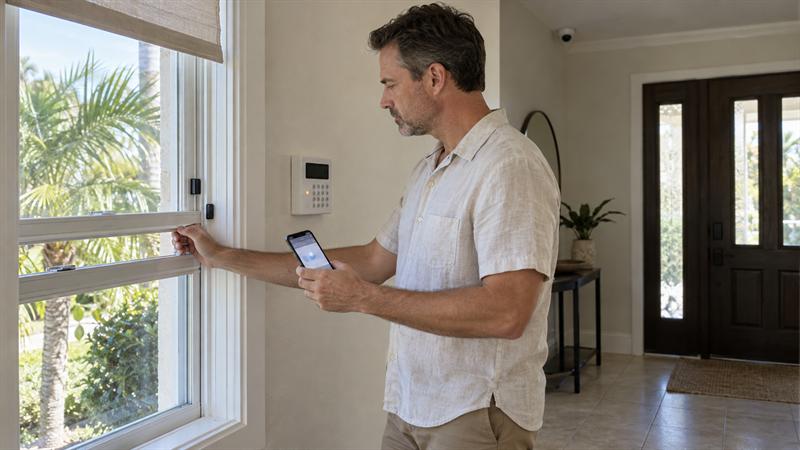
The keypad gives users direct control over the system. It is used to arm, disarm, and sometimes manage zones, delays, or user codes.
Many newer systems also include mobile app access, which adds remote control and alerts. Homeowners sometimes treat app access as only a convenience feature, even though it can also make it easier to see activity quickly and respond to alerts without being at home.
Sensors: what detects activity or danger
Sensors are the devices that notice something has changed. That might be a door opening, movement inside the home, glass breaking, smoke in the air, or water where it should not be.
Not all sensors solve the same problem. Intrusion sensors help detect unauthorized entry, while life-safety and environmental sensors address risks like fire, carbon monoxide, or leaks. When those roles are not clearly understood, coverage gaps are more likely.
Sirens and alerts: how the system gets attention
A siren creates a local alarm that people in or near the home can hear. Alerts can also go to a phone or to a monitoring center, depending on how the system is configured.
This is one of the most common points of confusion. A camera notification is not the same thing as an alarm signal, and a loud siren is not the same thing as monitored alert handling. Each serves a different purpose, and that difference shapes how quickly a problem is noticed.
How home alarm systems work from trigger to response
Home alarm systems work by moving a signal through a sequence. A sensor detects an event, the control panel determines what that event means, and the system sends an alert through its communication path. The result may be a local siren, a mobile notification, monitored response steps, or a combination of those actions.
Many homeowners understand the devices they can see but not the chain that connects detection to action. That disconnect can create confusion about why one setup feels complete and another does not.
For a deeper look at monitored response steps, this guide on how security monitoring works for homes and businesses explains what happens after the signal leaves the home.
What happens when a sensor is activated
When a sensor is activated, it sends a signal to the panel. The panel checks the zone, the current arming state, and the programmed rules for that event.
From there, the system may sound a siren, trigger an entry delay, send a phone alert, or transmit a monitored signal. If alerts do not match what happened in the home, the issue often points to programming, zone setup, or sensor placement rather than the device alone.
How the panel communicates with a monitoring center
The panel needs a path to send signals out. That path may use cellular, internet, landline, or a combination of communication methods.
This is something Cross Security, Inc. often finds in existing systems. The sensors may still be working, but the communication path is outdated, unsupported, or unreliable. That can leave a system looking active inside the home while still failing to send alerts where they need to go.
Communication method also affects compatibility. That is why homeowners comparing existing equipment and newer wireless security components need to look beyond whether the sensors still light up or chime.
What monitored alerts typically include
Monitored alerts are signals sent from the system to a monitoring center when a programmed event occurs. That is different from a local siren and different from an app notification.
Homeowners sometimes assume any alert on a phone means the system is fully monitored. It does not. A self-notification setup tells the user something happened. A professionally monitored setup adds another layer of alert handling, which matters when no one is available to see the notification right away.
Types of sensors commonly used in home security systems
Most home systems use a mix of perimeter sensors, interior sensors, and safety-related sensors. The right combination depends on the layout of the home and where the biggest risks begin.
Many pages mention these devices only in passing. What matters more is understanding what each one detects and where it fits into the larger protection plan.
Door and window sensors
Door and window sensors detect when an entry point opens. They are usually the first layer of protection because they monitor the perimeter, which is often where intrusion starts.
This is one of the most important components in a home alarm system. If perimeter coverage is missing or incomplete, a problem can begin at the outer edge of the home before the system responds.
Motion detectors
Motion detectors watch for movement inside the home. They are often placed in key interior areas where someone would likely pass after entering.
Motion sensors work best as a backup layer behind door and window protection, not as a replacement for it. When homeowners rely only on interior motion, detection starts later, after someone is already inside.
Glass break sensors
Glass break sensors listen for the sound pattern associated with breaking glass. They are useful in areas with large windows, sliding doors, or spaces where an intruder might bypass a door contact.
Placement matters. If the sensor is too far from the vulnerable glass or poorly positioned for the room, coverage can weaken. This is one reason a layered approach often works better than relying on one device type alone.
Smoke, carbon monoxide, and environmental sensors
Many modern systems also include smoke, carbon monoxide, water leak, or temperature-related sensors. These devices address safety and property-damage risks that go beyond intrusion.
They serve a different purpose, but they can still fit into the same monitored ecosystem. That makes integrated protection more practical because one system can help manage burglary alerts, fire-related signals, and environmental warnings through a single setup.
Wireless vs. hardwired security components
Wireless and hardwired security components both have a place. The most practical option depends on the home, the equipment already in place, and whether the goal is a new install, an upgrade, or an update to an existing system.
There is little value in replacing everything by default. Homeowners are sometimes told they need a full restart when the actual issue is narrower, such as outdated communication or a panel that no longer supports the right connections.
If your system shows these signs, it likely needs attention:
- The keypad works, but alerts do not reliably reach the phone or monitoring center
- Some sensors still respond, but the system cannot be updated or reconnected cleanly
- The home has wired contacts in place, but no clear path for modern monitoring
- You inherited equipment and do not know what still functions or what has been bypassed
When those signs show up together, the issue is usually no longer about one device. The system likely needs a compatibility and communication review.
Where wireless systems make sense
Wireless systems are often a practical choice for retrofits and homes where running new wiring would be disruptive. They also make device placement more flexible in many layouts.
The tradeoff is that wireless devices depend on batteries and signal integrity. That does not make them a poor choice. It means the system still needs to be planned correctly so convenience does not turn into maintenance neglect.
When existing wired equipment can still be useful
Existing wired equipment can still be valuable when the contacts, wiring runs, and panel location are in good condition. This is common in homes that were previously protected but have been disconnected or only partially updated.
In those cases, replacing every component may raise cost without solving the real issue. The more practical approach is often to determine what still works, what still communicates, and what needs to be upgraded to make the system reliable again.
Why compatibility matters before replacing everything
Compatibility matters because sensors, panels, and communication modules do not all work together automatically. If the wrong mix is installed, the result can be a system that looks current on the surface but performs poorly where it counts.
This is where costs rise quickly. Replacing devices before understanding the panel and communication path can lead to duplicate work, unsupported parts, or a system that still needs more changes before it can be monitored properly.
Which components are essential and which are optional?
Some components are essential because they form the backbone of detection and alerting. Others improve convenience, visibility, or automation but do not replace the basics.
This distinction helps homeowners avoid a common mistake: spending heavily on add-ons while leaving core protection incomplete. The better order is to secure the foundation first, then add extra features where they provide a clear benefit.
Core protection components most homes start with
- Control panel: processes signals and manages the system
- Keypad or app access: allows arming and disarming
- Perimeter sensors: protect doors and windows
- Interior detection: adds a second layer where needed
- Reliable communication path: sends alerts out of the home
- Monitoring setup: adds professional alert handling when included
If these pieces are weak or incomplete, the system will likely underperform no matter how many smart features are added later.
Add-ons like cameras, smart locks, garage doors, and thermostats
These add-ons improve visibility, convenience, and control. Cameras let homeowners see activity, smart locks help manage access, and connected garage doors or thermostats bring more of the home into one platform.
They still do not replace the core alarm functions. Homeowners sometimes assume more smart features automatically mean better security. In practice, these features work best when the underlying alarm components are already solid.
What to know if your home already has an alarm system
If your home already has an alarm system, the first question is not whether everything needs to be replaced. The better question is what still works, what still communicates, and what is still worth keeping.
This is where Cross Security, Inc. takes a more practical approach than companies that default to one standard package. Existing systems are often a mix of usable hardware, outdated communication, and unclear programming. Sorting that out can lead to better decisions and help avoid replacing equipment that still has value.
Homeowners dealing with inherited systems can also review what to check before keeping your existing security system in Tampa Bay for a more focused look at this issue.
Can existing sensors or panels still be used?
Yes, in many cases some existing sensors or panels can still be used, but not every system is equally reusable. The biggest issue is usually not whether the devices exist. It is whether they are compatible, supported, and able to communicate the way a current setup needs them to.
This is something Cross Security, Inc. often finds in older homes in Tampa Bay. The contacts may still open and close correctly, but the system may have lost the communication method that turns those signals into usable alerts or monitoring. That is why a functioning sensor does not automatically mean a functioning system.
When monitoring can be added without a full replacement
Monitoring can sometimes be added without a full replacement when the core equipment is still compatible and the communication path can be updated. In many cases, that means the decision turns on the panel and signal path more than on the sensors alone.
If monitoring is added correctly, the system becomes more than a local noise maker or a basic phone notification tool. If it is handled poorly, the homeowner can end up with a partial setup that still leaves response gaps when no one is available to act quickly.
Key Takeaways
- A home security system is a connected process, not just a collection of devices.
- The core components are the panel, keypad or app access, sensors, siren, communication path, and monitoring setup.
- Cameras add visibility, but they do not replace core alarm detection and alert handling.
- Many older systems still have usable parts, but communication and compatibility are where problems usually show up.
- When the system chain breaks at the panel or communication level, the whole setup becomes less reliable.
Conclusion: understanding the system before choosing upgrades or monitoring
The real problem is not that home security systems are too complicated. It is that many homeowners are shown devices without being shown how the system actually works. That can lead to missed gaps, poor upgrade decisions, and setups that look complete but fall short when detection, communication, and monitoring need to work together.
If that is not addressed, the system may end up with weak perimeter coverage, outdated communication, or alerts that do not reach the right place at the right time. Cross Security, Inc. is a practical next step for homeowners in Clearwater and the Tampa Bay area who want a clear review of what they already have, what still works, and what may need to change to make the system more dependable. That is especially important when an existing setup looks usable on the surface but still has hidden breakdowns in compatibility or monitoring.
Company Approach
Cross Security, Inc. helps homeowners make sense of what is already installed before pushing a full replacement. That matters because overselling a new package is common in this market when the better answer may be a more focused upgrade, a communication fix, or a clean way to add monitoring to compatible equipment.
This approach fits homeowners who want clear answers, practical recommendations, and contract-free monitoring options where they make sense. If the system is incomplete, disconnected, or no longer communicating properly, the next step is usually to identify the exact break in the chain and correct it before more money goes into the wrong components.
FAQ
What are the basic components of a home security system?
The basic components usually include a control panel, a keypad or app, sensors, a siren, a communication method, and monitored alerts when professional monitoring is part of the setup. Each part handles a different job, and the system only works well when those jobs connect correctly.
The main misunderstanding is thinking that visible devices are the entire system. For example, cameras may show what happened, but the panel and sensors are what detect the event and move it through the alert process.
How does a home alarm system work when a sensor is triggered?
When a sensor is triggered, it sends a signal to the control panel. The panel checks how that sensor is programmed, whether the system is armed, and what action should follow, such as a delay, a siren, a mobile alert, or a monitored signal.
The key point is that the sensor does not decide the outcome by itself. If a front door contact and a glass break sensor trigger under different conditions, the panel handles those events differently based on the setup. That is why programming and zone structure matter just as much as the device type.
Do I need cameras if I already have door and window sensors?
No, not always. Door and window sensors and cameras solve different problems. Sensors are often the first layer of intrusion detection, while cameras add visibility and context.
What changes the decision is the goal. If the main priority is detecting entry attempts, perimeter sensors are more foundational. If the goal also includes seeing activity, verifying visitors, or reviewing events later, cameras add meaningful value without replacing the need for core alarm components.
Can an existing home alarm system be reused or monitored again?
Yes, parts of an existing system can often be reused or monitored again when they are still compatible and functional. The issue is usually not whether the system exists. The issue is whether the panel, sensors, and communication path still work together in a useful way.
A common example is a home with working wired contacts but an outdated communication method. In that case, the sensors are not necessarily the problem. The system loses value because it cannot send reliable alerts through a current setup.
What is the difference between wireless and hardwired security components?
Wireless components communicate without new wires being run to each device, which makes them practical for many retrofits. Hardwired components use physical wiring, and they can still be valuable when that infrastructure is already in place and in good shape.
The decision usually comes down to the condition of the existing equipment, the ease of installation, and how the system needs to communicate going forward. The most common mistake is treating wireless as automatically better when an existing wired layout may still support a more efficient solution.
Which home security components are most important to start with?
The most important components to start with are the control panel, a reliable way to arm and disarm the system, perimeter sensors on likely entry points, and a dependable communication path. Interior motion detection is also important in many homes as a second layer.
What matters most is building the system in the right order. If those core elements are weak, smart locks, cameras, and automation features do not fix the real protection gap. They only add more features around it.
Recent Comments