
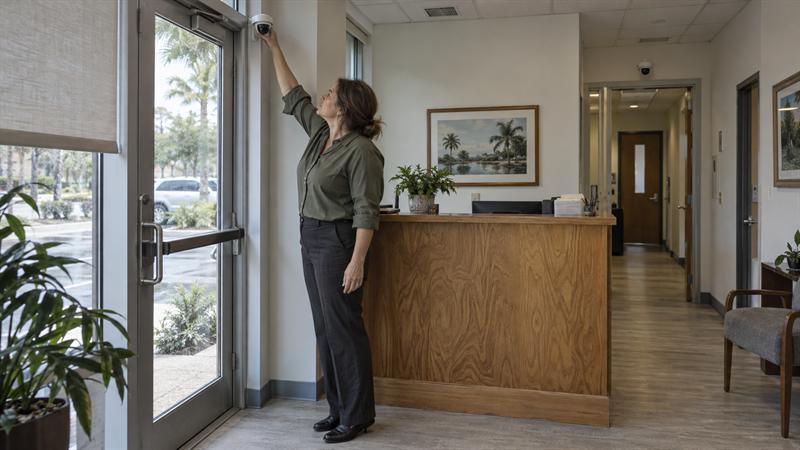
At Cross Security, Inc., this is one of the most common camera layout issues in small offices and commercial spaces across Tampa Bay. A business can have several cameras installed and still miss the footage that matters most. That usually happens when placement is based on convenience instead of access points, movement patterns, and after-hours risk.
Good business security camera placement is not about covering every inch of the building. It is about making sure the most important areas are visible in a way that supports accountability and provides footage that helps explain what happened during an incident.
Why Camera Placement Matters More Than Camera Count
More cameras do not automatically create better coverage. A business with several poorly placed cameras may have more blind spots and less useful footage than a business with fewer cameras positioned around the right choke points.
This is where many businesses run into trouble. The front entrance is covered, but the rear delivery door is not. The lobby is visible, but the hallway leading to storage or staff-only areas is missed. The result is footage that shows activity happened, but not enough detail to explain how the event developed or who was involved.
The most effective layouts are built around four clear goals:
- Deterrence: visible cameras at vulnerable entry points
- Awareness: seeing movement through key business areas
- Evidence: capturing usable footage instead of distant or obstructed video
- Accountability: documenting access, incidents, and movement through important spaces
A common mistake is assuming broad visibility is enough. In practice, wide shots across open rooms often miss the details that matter. Clear angles at entrances, hallways, and controlled-access points are usually more useful than trying to watch everything at once.
The 4 Goals of Business Camera Placement
Deterrence starts at doors, exterior approaches, and areas where someone is deciding whether to enter, linger, or test access. A visible camera in the right place can influence behavior more effectively than a hidden camera aimed at empty space.
Awareness means understanding how people move through the building. In offices, that often matters most in reception areas, shared corridors, and staff-only transitions. In retail or mixed-use spaces, it usually includes transaction zones and inventory paths.
Evidence depends on useful footage. This is a common issue with older layouts. A camera is in place, but it is mounted too high, aimed too wide, or pointed into glare. That can lead to footage that records motion but does not clearly show what happened.
Accountability comes from showing who entered a space, when they entered, and where they went next. That often gets lost when businesses focus only on large rooms instead of the routes between them.
Start with Your Highest-Priority Risks
Businesses should place cameras based on what needs to be protected first. The right layout for a small office is not always the right layout for a storefront, warehouse, or mixed-use property. A practical starting point is identifying where incidents are most likely to begin and where useful footage would matter most afterward.
For some businesses, the biggest issue is break-ins and unauthorized after-hours entry. For others, it is transaction disputes, internal access, visitor tracking, or coverage around inventory and equipment. A camera plan works best when it follows those priorities.
After-hours risk is a major factor for many commercial properties. If that is a concern, this article pairs well with how security monitoring works for homes and businesses, since cameras and monitoring are often most effective when they support the same high-risk areas.
Break-Ins and After-Hours Access
Rear doors, side entrances, and low-visibility exterior paths are often missed first. That is one reason businesses may have footage of a person already inside the building but no useful footage showing how entry happened.
After-hours coverage should show approach, access, and movement. If a camera only captures the inside of a doorway, the early part of the event may be lost. That can make incident review harder and leave key questions unanswered.
Employee, Visitor, and Operational Incidents
Not every camera decision is about stopping a break-in. In many offices and shared commercial spaces, the more frequent concern is understanding movement through reception, staff-only access, shared hallways, and areas where visitors or employees pass between departments.
This is often handled poorly when cameras are aimed broadly across desks or open work areas. That can create lower-value footage and raise trust concerns without improving visibility where incidents actually develop. In many office environments, entrances and circulation paths tell a clearer story than workstation-level monitoring.
Best Places to Install Security Cameras in a Business
The best camera locations are the places where people enter, exit, change direction, access assets, or create the highest level of business risk. This section answers the practical question directly: where should cameras go first if coverage needs to be useful, not just visible?
Front Entrances and Reception Areas
Front entrances should almost always be covered. This is where businesses need to capture who entered, when they entered, and how traffic moved in and out of the space. Reception areas can add another layer of value because they help document visitor access and early interactions.
The angle matters as much as the location. A camera aimed into bright glass or mounted too far back can reduce face visibility. This is a common issue during camera reviews. The camera is there, but the footage is not clear enough where it matters most.
Side Doors, Rear Doors, and Delivery Entrances
These areas are often higher risk than the front entrance because they receive less attention and less natural visibility. Staff entries, back doors, and delivery access points are where unauthorized entry, internal access issues, and after-hours activity often begin.
These cameras should capture both the doorway and the approach to it. If the angle only shows someone once they are already at the handle, the footage can lose context. This is where placement errors often lead to incomplete incident timelines.
Registers, Checkout Counters, or Payment Areas
Payment areas need focused coverage, not just general visibility. In businesses that handle transactions, disputes and accountability issues often happen where money changes hands, products are exchanged, or customer interactions escalate.
A common mistake is using one wide camera to cover the entire front area. That can result in footage that shows activity happened but not enough detail to support review. A tighter, more intentional angle often provides a clearer record than broad coverage across an entire room.
Hallways, Shared Office Areas, and Interior Traffic Paths
In office settings, interior cameras usually work best at choke points. Hallways, intersections, suite transitions, and controlled-access routes show how people move through the space and who passed through a restricted or shared area.
This is something many layouts miss. Cameras get aimed at large open workspaces when the more useful footage would come from the path between reception, offices, storage, and staff-only areas. If a business also uses alarm tools around opening and closing, understanding how security monitoring works for homes and businesses can help show how cameras and event timing support each other.
Storage Rooms, Inventory Areas, and Equipment Rooms
High-value rooms need coverage at the point of access. Storage rooms, inventory spaces, records rooms, and equipment areas usually matter most when someone enters or exits, not when a camera is trying to capture every shelf or every item inside.
This is a practical distinction that gets overlooked. Businesses often try to watch the entire room, but what usually matters is who accessed it, when they did, and what route they used. That often creates stronger accountability and more useful review.
Parking Lots, Building Perimeter, and Exterior Approaches
Exterior cameras help show approach patterns, loitering, vehicle movement, and after-hours activity around the building. These areas are especially important when incidents start outside and move inward.
Lighting, distance, and weather all affect how useful the footage will be. A camera that covers a large parking area without enough detail can create a false sense of coverage. In many cases, entrances, drive approaches, and dark corners deserve higher priority than broad empty views.
If your current setup sounds familiar, it may be time to reassess the layout.
- You have cameras, but side or rear entrances still are not clearly covered.
- Footage shows movement, but not faces, access details, or useful sequence.
- Most cameras point at open space instead of entry routes or asset access points.
- After-hours incidents would be hard to reconstruct from current angles.
When these signs are present, the issue is usually placement quality, not just camera quantity.
Where Not to Place Office or Business Security Cameras
Some spaces should be avoided completely, and others should be treated with caution. Good planning includes knowing where cameras create more problems than value.
This is also where trust matters. A layout that feels intrusive can create tension without improving visibility in the places that actually matter.
Restrooms, Locker Rooms, and Other Privacy-Sensitive Spaces
These areas should not be monitored with cameras. Privacy expectations are much higher in these spaces, and camera placement there usually creates serious concerns instead of solving a real coverage problem.
In practical terms, these are not the places where businesses should try to gain security visibility. Entry points to those areas are usually the more appropriate point of focus.
Break Rooms, Private Offices, and Workstation-Level Monitoring
These spaces are not automatically off limits, but they often provide less useful footage and create more employee concern than business owners expect. A camera aimed directly into a break room or across individual desks usually captures less relevant evidence than a camera covering the hallway or access point leading there.
This is where over-monitoring starts. A better approach is focusing on movement into and out of shared or restricted areas. That often gives clearer operational visibility without creating the same level of privacy concern.
How to Avoid Blind Spots and Low-Value Footage
A camera can be installed correctly from a hardware standpoint and still fail from a planning standpoint. Blind spots and low-value footage usually come from angle problems, lighting problems, or physical obstructions that were not considered during placement.
This can get worse over time because layouts change. Shelving moves, signs get added, displays shift, landscaping grows, and parked vehicles alter lines of sight. A setup that once seemed fine can gradually lose value without anyone noticing until footage is needed.
Lighting, Glare, and Nighttime Conditions
Windows, glass doors, reflections, exterior lighting, and dark corners affect image quality more than many owners expect. A camera that looks fine during the day can become far less useful at night if glare or low light reduces visibility at the exact point where detail is needed.
This is a frequent issue in front offices and parking areas. The coverage exists, but not in a way that supports useful review once lighting conditions change. That can leave footage that looks active but answers very little.
Height, Angle, and Obstruction Problems
Cameras mounted too high or too far back often capture movement without capturing detail. That usually means a person can be seen entering an area, but identifying features or action points are too small or too distant to help much.
Obstructions create the same problem. Shelving, signs, displays, corners, landscaping, and parked vehicles can all block or distort parts of the scene. This issue often develops slowly. The camera still appears to cover the area, but the actual footage becomes less useful over time.
Camera Placement by Business Type
Not every building should be approached the same way. The most practical camera layout depends on how people use the space, where access changes, and what parts of the business carry the highest risk.
Offices and Professional Suites
In offices, the highest-value locations are usually the main entry, reception, shared corridors, file or equipment rooms, and after-hours access points. These placements help document movement without trying to monitor every employee workstation.
A common pattern is over-covering open office space while under-covering the hallways and transitions that actually show who moved where. That can lead to broad footage with very little decision-making value.
Retail and Customer-Facing Businesses
Retail and customer-facing spaces need a different balance. Entrances, registers, key display areas, stockrooms, and rear access points usually deserve the highest priority.
Here, the goal is not just deterrence. It is also transaction clarity, inventory accountability, and a better view of how customer and staff movement overlap in high-activity zones.
Warehouses, Light Industrial, and Mixed-Use Spaces
Warehouses and mixed-use spaces typically need coverage around loading areas, bay doors, perimeter access, equipment zones, and major movement paths. Large open spaces can make owners think broad coverage is enough, but the more useful footage usually comes from access routes and transition points.
This is where scale causes confusion. A wide camera view across a large floor can look impressive while still missing the details needed around entry, equipment use, or inventory movement.
What to Do If Your Business Already Has Cameras
Not every business needs to replace its entire system. In many cases, the bigger issue is that the cameras are pointed at the wrong areas, mounted at the wrong angles, or missing a few high-priority locations.
This matters because businesses often assume poor results mean the whole system is outdated. In reality, repositioning, adding coverage in a few spots, or improving monitoring support often solves the more immediate problem faster.
For businesses evaluating current equipment before making changes, what to check before keeping your existing security system in Tampa Bay is a useful next read.
When Repositioning Helps More Than Replacement
If a camera already covers the right area but the footage is too wide, too high, or too obstructed, repositioning often helps more than adding another device. This is especially common in lobbies, office entrances, payment counters, and rear access doors.
If you are seeing activity but not useful detail, that usually means the problem is angle or distance. If entire entry points or movement paths are missing, that usually means added coverage is needed instead.
When to Add Monitoring or Integrate with Other Security Features
Some businesses need more than better camera angles. If the concern is after-hours entry, opening and closing accountability, or understanding alarm events more clearly, cameras work best when they support a broader security setup.
That is where monitoring and layered protection become more practical. Cameras show what happened. Alarm and monitoring tools help define when activity was detected, while cameras help show what happened around that time.
Small Business Security Camera Placement Checklist
Before installing new cameras or changing an existing layout, use this checklist to identify the most common gaps:
- Are all main and secondary entry points covered clearly?
- Can footage show faces or identifying detail where it matters?
- Are storage rooms, inventory areas, or equipment rooms covered at the point of access?
- Are blind spots being created by lighting, shelving, signs, corners, or parked vehicles?
- Does the setup support useful after-hours review?
- Are any cameras placed in ways that create privacy concerns without adding real value?
Conclusion
The real problem with business security camera placement is not always a lack of cameras. More often, the issue is that key entrances, movement paths, and asset access points are not covered in a way that produces useful footage. When that goes unaddressed, incidents can become harder to review, blind spots stay in place, and businesses keep relying on systems that look complete but leave out the moments that matter.
Cross Security, Inc. helps business owners address this by looking at how the space is actually used, where problems typically begin, and whether an existing system can be improved without unnecessary replacement. If your current cameras are missing side entrances, after-hours access points, or interior routes that explain what happened, this is a practical time to improve the layout before the same gaps create the same frustrations again.
Key Takeaways
- Business camera placement should follow access points, movement paths, and high-value areas, not open wall space.
- Front entrances matter, but side doors, rear doors, and delivery access are often where problems begin.
- Interior cameras usually provide the most value at hallways, transitions, and controlled-access points.
- Wide coverage is not the same as useful footage. Angle, lighting, and obstructions change everything.
- Many businesses can improve results by repositioning or expanding existing systems instead of replacing everything.
How Cross Security, Inc. Approaches Business Camera Planning
Cross Security, Inc. approaches camera placement as a coverage and decision problem, not just an equipment problem. That means looking at where people enter, where incidents typically begin, what footage would actually be useful later, and whether the current system is helping or simply recording activity without enough detail.
This approach matters for small businesses and offices because many do not need a complete restart. They need clearer coverage at the right doors, better visibility through shared paths, and a setup that supports after-hours awareness instead of leaving owners to discover gaps after something happens.
FAQ
Where should security cameras be placed in a small business?
Security cameras in a small business are usually most useful at entrances, exits, registers or payment areas, shared interior traffic paths, storage rooms, and exterior access points like rear or side doors. These are the locations where people, inventory, and incidents tend to intersect in ways that are easier to document clearly.
A common mistake is putting most cameras at the front of the building while leaving lower-visibility access points under-covered. In practice, a rear delivery door or staff entrance often creates more risk than the main public entrance. The important distinction is not just whether an area feels important, but whether it is where useful footage can show who entered, where they moved, and what happened next.
How many security cameras does a small office usually need?
A small office does not have one fixed camera count because the right number depends on layout, access points, and what the business needs to monitor. A compact office with one main entrance and a few shared hallways needs far fewer cameras than a similar-sized suite with multiple doors, restricted areas, or separate traffic paths.
What matters more than the number is whether the layout covers the highest-priority areas. One camera at reception and one at a key hallway can provide more useful visibility than several cameras aimed broadly across open workspaces. The decision changes based on movement and access, not square footage alone.
Where should office security cameras not be installed?
Office security cameras generally should not be installed in restrooms, locker rooms, or other clearly privacy-sensitive spaces. These areas create far more concern than value and are not where most useful security visibility should come from.
Other areas require judgment, including break rooms, private offices, or camera angles aimed directly at individual desks. What gets misunderstood is that more interior footage does not automatically improve security. In most office settings, entrances, hallways, and controlled-access routes provide more useful accountability without creating the same level of privacy concern.
Is it better to add more cameras or move the ones already installed?
Sometimes moving existing cameras is more effective than adding new ones, especially when the real problem is angle, height, or placement rather than camera count. A device that covers a doorway from too far away or from a glare-heavy angle often records movement without capturing enough detail to help later.
For example, a business may assume it needs another lobby camera when the actual issue is that the current camera is aimed too wide to capture faces clearly. In that case, repositioning usually improves footage more than simply increasing the number of cameras. The key question is whether the gap is a true blind spot or just low-value coverage in an area that is already being recorded.
What areas matter most for after-hours camera coverage?
After-hours camera coverage matters most at vulnerable access points and low-visibility exterior approaches. That usually includes rear doors, side entrances, delivery areas, parking lot access, and parts of the building perimeter that are less visible from the street.
These locations matter because after-hours incidents usually begin outside the building before anyone enters. A camera that only shows the inside of a door misses how someone approached, whether a vehicle was involved, and what route was used. The footage becomes far more useful when it captures the beginning of the event instead of only the middle.
Can business security cameras work with an existing alarm system?
Yes, business security cameras can often work alongside an existing alarm system, especially when the goal is better visibility around opening, closing, and after-hours activity. Cameras and alarms do different jobs. Alarms help define when activity was detected, while cameras help show what actually happened.
This is especially useful at access points. If an alarm event occurs at a rear door after hours, camera footage covering the approach and the entry point gives more context during review. The important distinction is that cameras do not replace alarms, and alarms do not replace cameras. When they support the same high-risk areas, the overall system becomes easier to understand and more useful in practice.
Recent Comments